Study
Should You Join or Aggregate First in a SQL Interview?
TrueInterview
October 26, 2026 · 15 min read
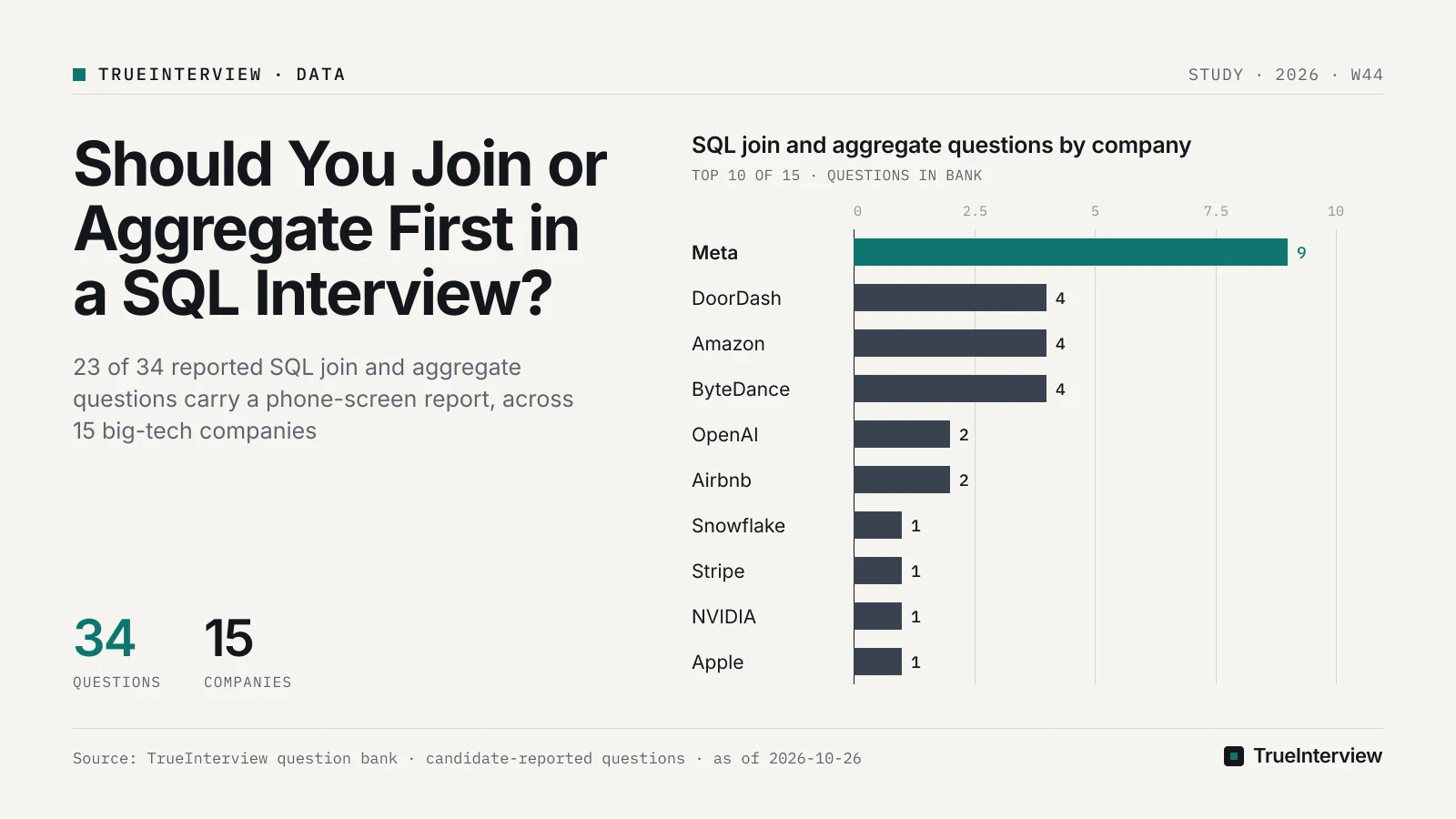
Aggregate first when the column you sum or average sits on the one side of a one-to-many join, or when you join two one-to-many tables to the same parent; otherwise join first, using INNER for match-only lookups and LEFT, with right-table filters kept in ON, when a cohort must survive as the denominator. As of 2026-10-26, TrueInterview's bank holds 34 candidate-reported SQL join and aggregate questions from 15 big-tech companies, and 23 of them carry a phone-screen report. Our take: the join keyword is rarely what these prompts test. They are metric questions, and the answer turns on which rows must survive and what one output row means.
Disclosure: TrueInterview is an interview-preparation product and publishes this article. Facts about other products come from their public pages on the dates listed under Sources.
What should you decide before you type JOIN?
Decide which input rows must survive, what one output row represents, and whether the right-hand table can match a row more than once. PracHub's guide puts the first two as "Predict two things before running a join: which input population must survive, and what one output row represents." Write both answers as a comment above the query, then let them pick the join type and the aggregation order.
PracHub's guide separates the two ways a query goes wrong: the join type decides which unmatched rows are kept, and key uniqueness decides how many matches each row produces. The same guide says the prediction "catches both silent row loss and silent row multiplication". Those two failures are silent because the query still runs and returns plausible numbers, which is why an interviewer can watch you miss them.
The decision rule below maps the wording of a prompt to a join and a filter placement. The examples are reported titles from our bank, so you can practise each row on a real prompt.
| If the prompt asks for | Rows that must survive | Join and filters | Reported example |
|---|---|---|---|
| A rate or percentage of a cohort | Every cohort member, matched or not | Cohort table on the left of a LEFT JOIN; right-table filters in ON | Signup Activation Rate (ByteDance) |
| An average or total per entity over a one-to-many table | Every entity, exactly once | Collapse the many side to one row per key in a CTE, then LEFT JOIN | Average Reactions per Post (Meta) |
| A share of users with no later event | Cohort members, flagged by whether a match exists | NOT EXISTS, or LEFT JOIN plus IS NULL, inside the rate | Compute percent of first-cancel users who never return (Pinterest) |
| Pairs drawn from one table | Matched pairs only | Self join with INNER semantics, filters in WHERE | Find recommended friend pairs by shared listening (Amazon) |
Our take: the comment line is the cheapest insurance in a timed screen. It takes a few seconds, gives the interviewer something to agree with before you write syntax, and turns a later bug into a check against your own stated grain.
What do the reported join and aggregate questions look like?
They look like product metrics. Besides the prompts in the table above, the reported titles include 'Average Deal Size' at Salesforce, a phone-screen report from 2026-07. None of these titles asks you to define a FULL OUTER JOIN; each asks for a number that a wrong grain quietly corrupts.
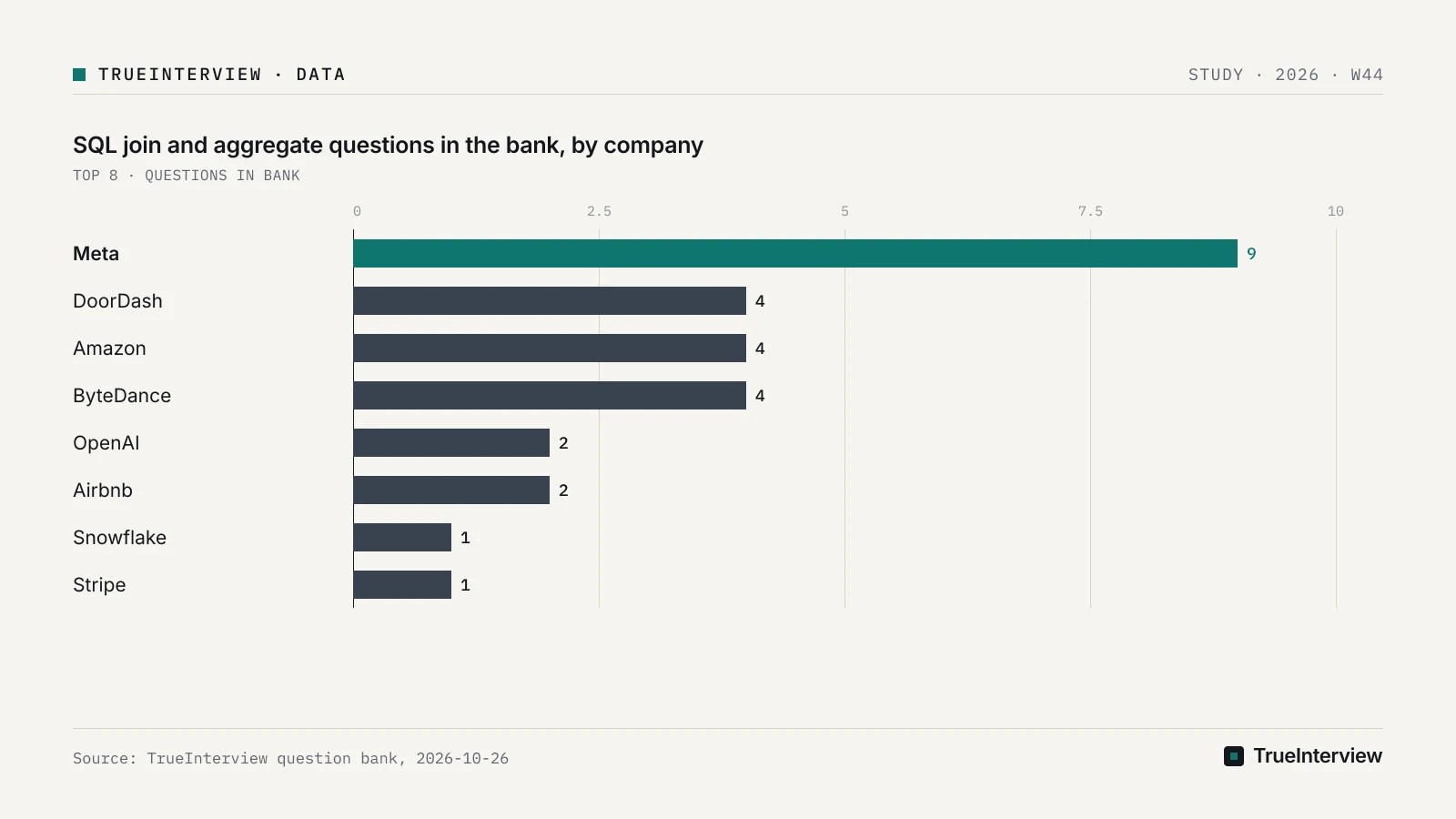
Meta files the most questions in this set, followed by DoorDash, Amazon and ByteDance.
| Company | Join and aggregate questions in the bank |
|---|---|
| Meta | 9 |
| DoorDash | 4 |
| Amazon | 4 |
| ByteDance | 4 |
| OpenAI | 2 |
| Airbnb | 2 |
| Snowflake, Stripe, NVIDIA, Apple | 1 each |
| Five other companies, including Salesforce and Pinterest | 1 each |
These are counts of what candidates reported, not a measure of how often a company asks SQL. Use them to choose which prompts to open first: if Meta is on your calendar, start with 'Average Reactions per Post', and apply the same grain checks to whichever company you face.
The round split matters more than the company split. Candidates reported 23 of these questions in phone screens, 7 in onsites and 4 in online assessments, and one question can carry more than one round. Plan for a short, timed, single-query screen first: one prompt, one correct number, and a clear explanation of the grain. The combined join-and-window prompts described further down appear in phone screens too, so add one to every loop's preparation.
16 of the 34 questions were last reported within the 12 months before 2026-10-26. The dated examples in this article run from 2025-10 to 2026-09, so treat the titles as shapes to master rather than a list of current prompts to memorise.
Should you use INNER JOIN or LEFT JOIN?
Our recommendation: use INNER for match-only lookups and LEFT whenever the left table is a population you must keep, usually the denominator of a rate. The PostgreSQL documentation says "INNER is the default" join type when none is written, and that an inner join yields a row for each pair of rows that satisfies the condition. Anything without a partner disappears, which is correct for lookups and wrong for cohorts.
The PostgreSQL tutorial shows the loss directly: its inner join "ignores the unmatched rows in the weather table". A LEFT JOIN keeps each left row at least once, and the PostgreSQL tutorial says the right-table columns of an unmatched row come back as nulls. That null-filled row is what keeps a non-activated user inside the denominator of 'Signup Activation Rate'.
Count the numerator from a right-table column, such as COUNT(DISTINCT e.user_id), or with a CASE expression. COUNT() counts the null-filled rows as well, so a LEFT JOIN with COUNT() reports a rate near one hundred percent and looks plausible.
NULL keys need a separate check. PracHub's guide notes that a NULL join key does not match an ordinary equality condition, so a cohort row with a missing user id vanishes from an INNER JOIN and survives a LEFT JOIN with nothing attached. On 'Signup Activation Rate', decide whether a signup row with no user id belongs in the denominator, and say which choice you made.
Our take: when you are unsure, start from the cohort with a LEFT JOIN and count matches explicitly. Switching to INNER later is a one-word edit, while finding a denominator that silently shrank is the bug that costs a phone screen.
Does a filter go in ON or WHERE?
In a LEFT JOIN, a condition on the optional right-hand table goes in ON, and a condition that defines which left rows belong to the population goes in WHERE. PracHub's guide says such a condition "belongs in ON because employees are optional matches and every department must remain." For an INNER JOIN the two placements return the same rows, so the question only bites on outer joins.
The reason is order of operations. The PostgreSQL documentation describes WHERE, GROUP BY and HAVING as "a pipeline of successive transformations performed on the table derived in the FROM clause". A WHERE condition on a right-table column therefore runs after the null-filled rows exist, evaluates to unknown on them, and removes them. PracHub's guide says moving the predicate to WHERE would remove the unmatched row and "change the preserved population".
-- Keeps every cohort member; the date rule only limits which events attach.
SELECT c.user_id, COUNT(e.user_id) AS qualifying_events
FROM cohort AS c
LEFT JOIN events AS e
  ON e.user_id = c.user_id
 AND e.event_date >= c.signup_date
GROUP BY c.user_id;

-- Moving the date rule into WHERE drops members with no qualifying event:
-- WHERE e.event_date >= c.signup_date
The PostgreSQL documentation also warns that ON conditions unrelated to the join itself are useful but "needs to be thought out carefully". The one deliberate exception is the anti-join test WHERE e.user_id IS NULL, which keeps exactly the unmatched rows on purpose.
You will meet a performance argument for WHERE in prep material. KnowledgeHut's join guide says WHERE is applied after the join and ON during it, then concedes that "modern databases have a planning phase where they optimize the query plan which makes this choice irrelevant." Our take: decide placement by meaning, say so in one sentence, and leave speed to the planner, because the planner can reorder work but cannot restore rows your predicate removed.
When should you aggregate before joining?
Aggregate first when the column you sum or average sits on the one side of a one-to-many join, or when two one-to-many tables join the same parent. Joining first repeats each parent row once per child, so sums of parent-side columns inflate and averages of them tilt toward the entities with the most children. PracHub's guide gives the fix: "First collapse projects to one row per employee, then join at employee grain and aggregate to department grain."
The same guide shows the failure on a small table, where joining raw project rows counts one salary twice. PracHub's guide also warns that a key must distinguish rows on both sides, and that matching on only part of a composite key creates false pairs. Both problems produce more rows than the grain you wrote in your comment line.
To spot fanout under time pressure, compare COUNT(*) with COUNT(DISTINCT parent_id) right after the join. If the first number is larger, every parent-side value you sum is now weighted by its child count.
Worked example: Average Reactions per Post
Meta's 'Average Reactions per Post' was reported in a phone screen, most recently in 2026-05. Read literally, the title asks for one number averaged across posts, and a typical reactions table holds many rows per post. Averaging a column stored on posts over the joined rows gives a post with many reactions more weight than a quiet one, while COUNT(r.id)::numeric / COUNT(DISTINCT p.id) after a LEFT JOIN still returns the right average; without the cast, Postgres divides integers and truncates. The real trap is an INNER JOIN, which drops posts that have no reactions at all. Of the two correct options, pre-aggregation is the clearer one, because it keeps the grain at one row per post where you can see it.
The sound order is three steps. Collapse reactions to one row per post in a CTE, LEFT JOIN posts to that CTE so silent posts survive, and average at post grain, treating a missing count as zero. The skeleton below uses generic names, not any company's schema.
WITH per_key AS (
  SELECT parent_id, COUNT(*) AS n
  FROM many_side
  GROUP BY parent_id
)
SELECT AVG(COALESCE(p.n, 0)) AS avg_per_entity
FROM one_side AS o
LEFT JOIN per_key AS p ON p.parent_id = o.id;
Apply the same grain check to Snowflake's 'Project Duration & Budget per Employee', a phone-screen report from 2026-06. If an employee can appear on several project rows, any employee-level value repeats after the join, so collapse projects per employee before you add employee attributes. For 'Average Deal Size', ask whether one deal can appear on several rows before averaging.
Our take: this is where we would spend the most practice time. Most prep pages teach join types and stop; the per-entity averages in our bank are exactly where a correct-looking query is wrong.
When do you need a self join, an anti-join, RIGHT or FULL?
Self joins and anti-joins appear in the reported titles, while RIGHT and FULL OUTER JOIN rarely need to appear in an answer. Amazon's 'Find recommended friend pairs by shared listening', reported in a phone screen in 2025-11, reads as a self-join shape: one listening table on both sides, matched on what two users share. Practise it before the exotic join types.
The PostgreSQL tutorial confirms that a table can be joined against itself. In a pair query, add a condition such as a.user_id < b.user_id so each pair appears once and nobody is paired with themselves.
For the 'never return' wording in Pinterest's prompt, use an anti-join. PracHub's guide says NOT EXISTS "expresses that inverse safely even when the right-side join column contains NULL." NOT IN against a subquery that returns a single NULL yields no rows at all, so prefer NOT EXISTS and say why.
PracHub's guide notes that a RIGHT JOIN can always be rewritten as a LEFT JOIN with the tables swapped, and interviewers read left-to-right queries faster. The PostgreSQL documentation says a FULL OUTER JOIN also keeps unmatched rows from the second table, with nulls on the first side, and PracHub's guide calls it useful for reconciliation because it exposes missing records on either side. Reach for it only when the prompt asks what is missing from both sources.
Two habits avoid accidental multiplication. The PostgreSQL documentation says listing several tables in FROM cross-joins them, and that tables of N and M rows give N * M rows. The PostgreSQL documentation also warns that NATURAL joins pick up any new matching column after a schema change, so name the key in ON.
What else gets tested in the same screen?
Expect the join inside a larger task. DoorDash's 'DE / AE Screen: SQL + Python (Sliding Window + Joins)' is a phone-screen report from 2026-03, and OpenAI's 'Basic SQL Querying (Filtering, Aggregation, Join, Window Functions)' is an OA report from 2026-02. Build the join as one CTE in a multi-step query, then add the window or the Python step on top of it.
Airbnb's 'Estimate Page-Visit Duration from the Next User Event' is an onsite report from 2026-09. The title describes a next-event pattern, usually LEAD over each user's events ordered by time, and any join that adds page or user attributes should happen at event grain before the window runs. Apple's 'Follow-Up Airpod Percentage' is an onsite report from 2026-07. Its title reads as a cohort rate, so the LEFT JOIN and ON rules above likely apply.
Write these in layers, one CTE per grain, with names such as per_user_events or per_post_reactions that state what one row represents. The PostgreSQL tutorial calls it good style "to qualify all column names in a join query" and says explicit JOIN syntax makes the meaning easier to understand.
Our take: for a phone-screen-only loop, practise the cohort, per-entity and self-join shapes from the phone-screen titles shown above first. Whatever the loop, add at least one prompt that combines a join with a window function.
What changes at senior and staff level?
Our take, since this set has no level breakdown: at senior and staff level the bar moves from a query that runs to an explanation of why it is correct. On 'Signup Activation Rate', that means saying before you type why the cohort sits on the left and what happens to a signup with a NULL user id. On 'Average Reactions per Post', it means naming the fanout before the interviewer asks.
Prepare for follow-ups one level up from the query, such as what changes if a user can sign up twice, whether a deleted post still belongs in the denominator, and which index you would add if the reactions table grew large. TestGorilla's hiring guide rewards brevity, saying "Some of the best answers to this joins in SQL interview question will be concise and easy to follow." For the double-signup follow-up, say in one sentence that you take each user's first signup in a CTE so the denominator counts people rather than signup rows, then add that CTE.
Down-leveling note (our view): a SQL screen is usually a gate rather than the round that sets level. The level signal tends to come from rounds with open scope, such as an analytics case discussion or the project deep dive. A correct query passes the gate; a correct query with its grain and NULL handling explained is what lets an interviewer write that you reason like a senior engineer.
How we counted
Counts come from TrueInterview's question bank as of 2026-10-26 and cover the questions filed as SQL join and aggregate practice questions. They are candidate-reported questions reconstructed for practice, not any company's official question list. Every question in the set carries the same subtype, SQL, so the decision shapes in the first table are our reading of the titles, and round tallies overlap because one question can be reported in more than one round.
FAQ
Why does my LEFT JOIN return the same rows as an INNER JOIN?
Almost always because a condition on a right-table column sits in WHERE. The WHERE step runs after the join, sees nulls on the unmatched rows, and discards them, which is the INNER JOIN result. Move that condition into ON, or keep it in WHERE only when you mean to restrict the population. If the counts still match, every left row may simply have a partner, which you can confirm by testing the right-side key with IS NULL.
Are join conditions always based on equality?
No. TestGorilla's guide lists whether join conditions are always equality-based as an interview question, and the honest answer is that any Boolean expression works in ON. Range conditions are common in metric prompts: an event date between a signup date and a later cutoff, or a.user_id < b.user_id in a pair query. Inequality joins can multiply rows quickly, so check the row count right after writing one.
How many tables should I be comfortable combining at once?
Three or more without hesitation. TestGorilla's guide suggests asking mid-level candidates to write syntax that joins three tables, and it gives top marks to candidates who know to define multiple CTEs in one WITH clause separated by commas. In practice, build each CTE at one stated grain and join the CTEs, rather than chaining five raw tables in a single FROM clause where fanout is hard to see.
What is the difference between a join and UNION?
A join adds columns by matching rows across tables, while UNION stacks result sets as additional rows. TestGorilla's guide draws the same line, saying programmers use UNION "to combine data into new rows". In interview prompts, UNION ALL appears when you need to combine two event sources before aggregating, and a join appears when you need attributes from another table. Choose UNION ALL over UNION unless duplicates must be removed.
Do indexes and EXISTS performance come up in SQL screens?
Occasionally, as a follow-up after the query is correct. KnowledgeHut's join guide says indexes on join columns can greatly improve join performance and that EXISTS stops searching once it finds a matching row. Mention an index on the join key when asked about scale, and use EXISTS for semi-joins and anti-joins because it reads clearly and avoids the NULL trap.
Where can I practise these prompts on Postgres?
TrueInterview says SQL on its site runs on Postgres and that SQL questions are judged on hidden tests that show the case you failed. According to its site, the first few questions at every company are free with no card needed. Start with the cohort-rate and per-entity prompts: any test case containing a cohort member with no match would expose both the INNER JOIN and the COUNT(*) mistakes described above.
Your practice plan
A three-week plan for someone working full time, at about forty-five minutes on most weekdays:
- First week, cohort rates. Solve Signup Activation Rate and Follow-Up Airpod Percentage. Before each query, write one comment line naming the surviving population and what one output row represents, then check the final number against that line.
- First week, anti-joins. Solve Compute percent of first-cancel users who never return twice, once with NOT EXISTS and once with LEFT JOIN plus IS NULL, and confirm both return the same rate.
- Second week, pre-aggregation. Work Average Reactions per Post, Average Deal Size and Project Duration & Budget per Employee. After each join, compare COUNT(*) with the distinct parent count before you aggregate.
- Second week, filter placement. Take your cohort query from the first step, move the right-table date filter from ON to WHERE, and compare row counts. Write one sentence explaining the difference, as you would to an interviewer.
- Third week, combined prompts. Solve Estimate Page-Visit Duration from the Next User Event, then the DoorDash SQL + Python screen and OpenAI's basic SQL querying set, naming the grain of every CTE.
- Third week, self joins. Write Find recommended friend pairs by shared listening from memory, including the condition that removes mirrored and self pairs.
- Throughout, log the failure type. When a hidden test fails, record whether the cause was row loss, row multiplication or a NULL key; that short list is your review sheet for the night before the screen.
Sources
- TrueInterview question bank — SQL join and aggregate at big-tech companies — counted 2026-10-26
- SQL Joins: Every Join Type with Runnable Examples and Exact Results | PracHub Knowledge Hub — checked 2026-10-26
- PostgreSQL: Documentation: 18: 7.2. Table Expressions — checked 2026-10-26
- PostgreSQL: Documentation: 18: 2.6. Joins Between Tables — checked 2026-10-26
- Top Database Interview Questions and Answers for 2024 — checked 2026-10-26
- 33 joins in SQL interview questions to ask professional engineers — checked 2026-10-26
- Interview prep compared: your application, end to end · TrueInterview — checked 2026-10-26
Last reviewed: 2026-10-26.