Study
How to Prepare for SQL Window Function Interviews (2026)
TrueInterview
October 19, 2026 · 16 min read
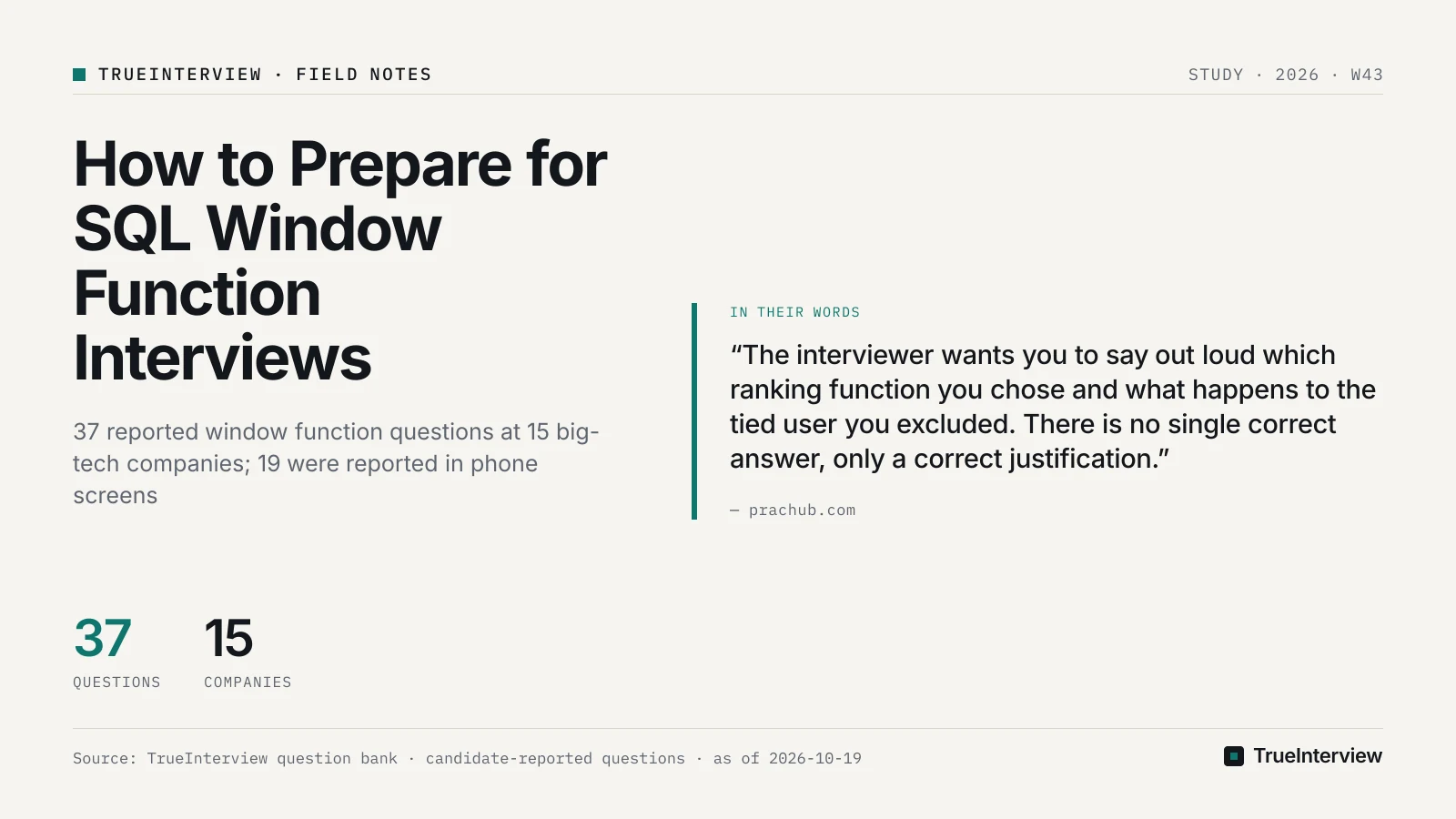
As of 2026-10-19, TrueInterview's bank holds 37 SQL window function questions reported at 15 big-tech companies, and 19 of them were reported in phone screens, against 13 onsite and 5 in OAs. Prepare in four stages: ranking and top-N per group, running and rolling frames, consecutive-day streaks with LAG and LEAD, then retention cohorts. The reported prompts are business questions, often mixed with joins and aggregation; in our view, the details that separate answers are tie handling, frame semantics and filtering after the window. Drill a tie at the cutoff, a duplicate date and a missing date on each reported prompt instead of memorizing what each function returns.
Disclosure: TrueInterview is an interview-preparation product and publishes this article. Facts about other products come from their public pages on the dates listed under Sources.
Which companies and rounds report window function questions?
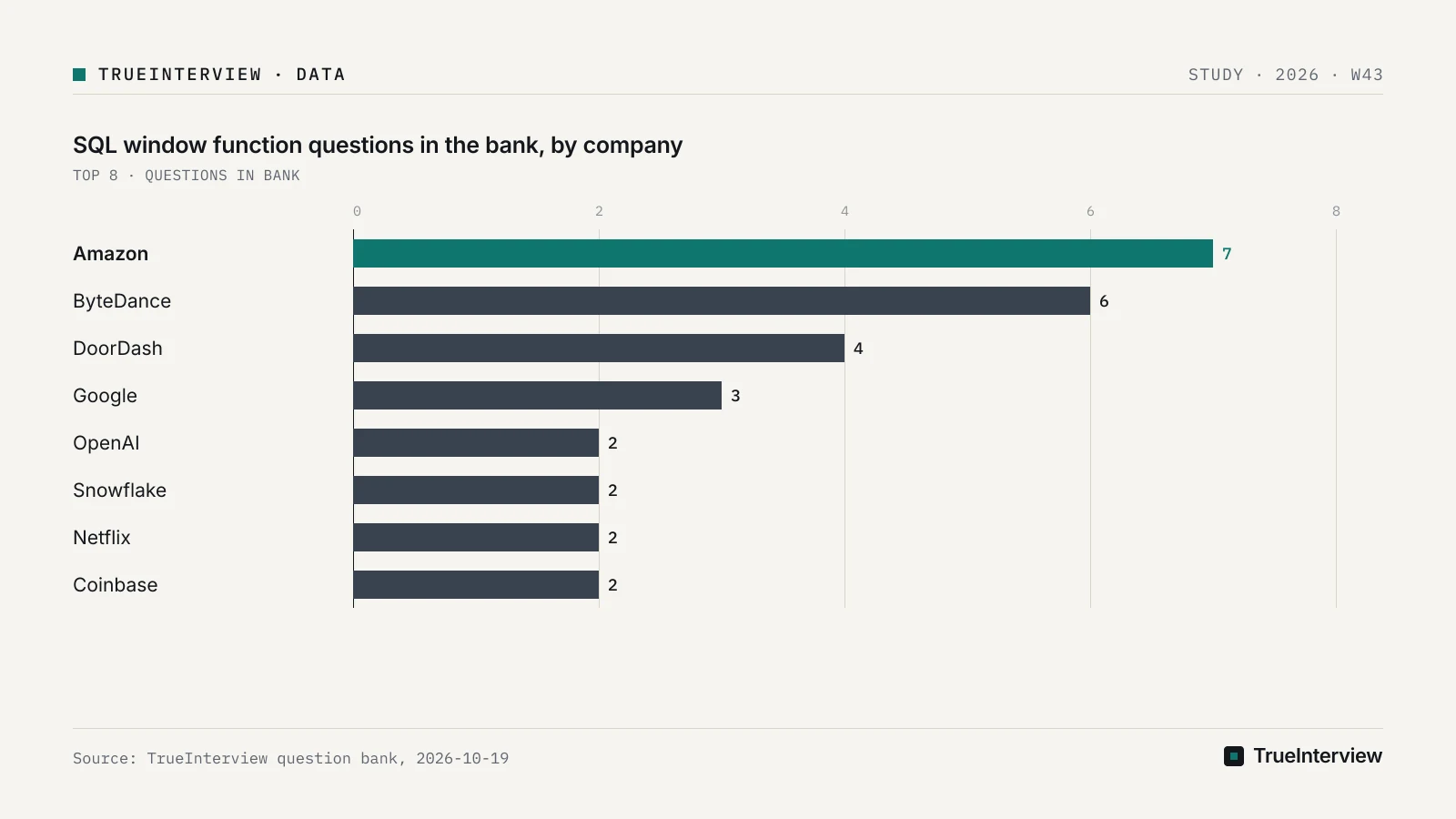
Amazon files the most, with 7 of the 37 questions, followed by ByteDance with 6, DoorDash with 4 and Google with 3; OpenAI, Snowflake, Netflix, Coinbase, Meta and Pinterest file 2 each. These are reporting counts, not how often a company asks. If Amazon or ByteDance is your target, start with their prompts in the pattern table below, and treat the other companies' prompts as practice for the same techniques.
The round split matters more than the company split for planning. The reported phone-screen prompts include Amazon's running total and Snowflake's streak, so build speed on those two patterns first, with ranking as the foundation underneath them. Onsite and OA preparation then adds tie discussions, retention cohorts and multi-step queries on top of that core.
Read the dates with care. Only 10 of the 37 questions carry a last-reported date within the 12 months before 2026-10-19; the rest are older or undated. Read the counts as a record of which patterns candidates have reported, not as a list of current prompts, and drill techniques that transfer across titles rather than any single question.
Which patterns do the reported prompts fall into?
Four stages cover the dated examples: ranking, running and rolling totals, streaks with LAG and LEAD gap detection, and retention cohorts, with mixed-skill prompts throughout. The grouping is ours, read from the titles, because every question in the bank carries the same subtype, SQL. Practise them in the order of the table.
| Stage | Pattern | Reported prompt | Company, round, last reported | Practise |
|---|---|---|---|---|
| First | Ranking, top-N per group | Rank Departments by Student Count | Oracle, onsite, 2026-08 | Rank Departments by Student Count |
| First | Ranking, top-N per group | Write SQL to rank top products per category | Coinbase, onsite, 2025-12 | Rank top products per category |
| Second | Running totals | Cumulative Purchases by Product Type | Amazon, phone screen, 2026-08 | Cumulative Purchases by Product Type |
| Third | Streaks (gaps and islands) | Longest Consecutive Login Days per User | ByteDance, OA, 2026-07 | Longest Consecutive Login Days per User |
| Third | Streaks (gaps and islands) | Find Users with Seven Consecutive Impression Days | Airbnb, onsite, 2026-09 | Seven Consecutive Impression Days |
| Third | Streaks (gaps and islands) | Marketing Touch Streak | Snowflake, phone screen, 2026-07 | Marketing Touch Streak |
| Fourth | Retention cohorts | Aggregate D1 retention cohorts in SQL | Netflix, onsite, no month reported | Aggregate D1 retention cohorts |
| Throughout | Mixed skills (SQL and Python; title names a sliding window and joins) | DE / AE Screen: SQL + Python (Sliding Window + Joins) | DoorDash, phone screen, 2026-03 | DoorDash DE / AE screen |
| Throughout | Mixed skills | Basic SQL Querying (Filtering, Aggregation, Join, Window Functions) | OpenAI, OA, 2026-02 | OpenAI basic SQL querying |
| Throughout | Mixed skills | Analyze video flags and reviews with SQL | Google, OA, no month reported | Analyze video flags and reviews |
Read the table as one skill in four layers. Ranking teaches you to control ties; running totals add the frame clause; streaks reuse ROW_NUMBER on deduplicated dates; a retention query combines a per-user first date with a next-day check and an outer aggregation. Each practice page runs your query on Postgres against hidden tests, according to TrueInterview's site, so learn the technique here and let the tests confirm the details.
Our take: learn three or four queries end to end, each with its edge cases, and pick up the remaining functions, such as NTILE and PERCENT_RANK, only when a prompt needs them. None of the titles above names a percentile function, so a function-by-function study order spends time where the prompts do not.
What mechanics do you need before the first drill?
Four rules sit under every query in the table above. A window function keeps every row, PARTITION BY sets the groups, ORDER BY inside OVER turns a partition total into a running value, and the window runs after WHERE and GROUP BY. You can confirm all four in one sitting by running a single SUM() OVER query with and without PARTITION BY and ORDER BY; spend the remaining weeks on ties and frame clauses.
The PostgreSQL documentation says window functions "do not cause rows to become grouped into a single output row like non-window aggregate calls would". The same documentation says that omitting PARTITION BY leaves a single partition containing all rows. Mode's SQL tutorial adds that without ORDER BY in the window, each value is the sum of its whole partition rather than a running total.
Two consequences matter in interviews. The PostgreSQL documentation says a row removed by the WHERE condition is not seen by any window function, so a date filter applied too early can change who counts as a first-time user. The same documentation says an aggregate call is valid inside a window function's arguments, which is how you rank grouped totals in one SELECT, as in RANK() OVER (ORDER BY COUNT(*) DESC) after a GROUP BY.
How do you handle ties in ranking and top-N questions?
Choose between ROW_NUMBER, RANK and DENSE_RANK by what should happen to a tied row at the cutoff, and say that choice aloud before you write the query. PracHub's guide says ROW_NUMBER, RANK and DENSE_RANK produce identical output until rows tie, and that interviewers create the tie on purpose. Oracle's and Coinbase's ranking prompts were both reported onsite, the round where you have time to defend a choice.
Mode's tutorial says RANK gives tied rows the same rank and then skips ranks, while DENSE_RANK gives them the same rank with no ranks skipped. The PostgreSQL documentation says row_number numbers tied rows "in an unspecified order". PracHub's guide calls ROW_NUMBER non-deterministic when the window's ORDER BY has ties and recommends adding a unique tiebreaker column.
| Criterion | ROW_NUMBER with a unique tiebreaker | RANK | DENSE_RANK |
|---|---|---|---|
| Tied rows | Different numbers, in the order your tiebreaker sets | Same rank | Same rank |
| After a tie | The next number | Skips ranks | No gap |
| A "top N" filter returns | Exactly N rows per group | N or more rows when a tie sits at the cutoff | All rows holding the top N distinct values |
| Main risk | Silently dropping a tied row | Returning more rows than the reader expects | Returning far more than N rows |
| Best for | Exactly N rows, ties broken by a stated rule | Top N that keeps everyone tied at the cutoff | Top N distinct values |
PracHub's guide lists a Meta question on resolving ties for top-10 users. For that question, the guide puts the grading plainly: "There is no single correct answer, only a correct justification." That is the standard to practise against for every top-N prompt.
Our take: when a prompt is silent on ties, submit RANK and say why, because it keeps the tied row visible instead of dropping it at random. Switch to ROW_NUMBER only when the prompt asks for exactly N rows, and then name the tiebreaker column in the ORDER BY. Write the choice as a one-line comment above the query; it costs seconds and answers the follow-up before it comes.
How do frames change running totals and rolling averages?
Write ROWS or RANGE explicitly in every running or rolling OVER clause. With ORDER BY and no frame, the PostgreSQL documentation says the frame runs from the start of the partition through the current row, plus any following rows equal to it. Amazon's 'Cumulative Purchases by Product Type' was reported in a phone screen in 2026-08, so make it your running-total drill.
The documentation's running-sum example says the sum runs up through the current row, "including any duplicates of the current one". PracHub's guide names the cause: the default frame with ORDER BY is RANGE, not ROWS, so with duplicate sort keys a running total counts rows that have not been printed yet. On a table with two purchases on one date, both rows show the same total, which surprises candidates who expected a row-by-row sum.
-- running total, one value per row, deterministic
SUM(amount) OVER (PARTITION BY grp
                  ORDER BY event_date, event_id
                  ROWS BETWEEN UNBOUNDED PRECEDING AND CURRENT ROW)

-- trailing seven rows, which is seven days only if every date has exactly one row
AVG(daily_total) OVER (PARTITION BY grp
                       ORDER BY event_date
                       ROWS BETWEEN 6 PRECEDING AND CURRENT ROW)
Rolling averages carry the second trap. PracHub's guide warns that ROWS BETWEEN 6 PRECEDING AND CURRENT ROW counts rows, not days, which breaks when a date is missing from the table. DataLemur's guide describes moving averages as "Calculating averages over a specific range of rows", which is only correct once every date has a row.
Our take: for date-based metrics, aggregate to one row per group per day, join that to a complete calendar of dates so missing days appear with zero, and only then apply the row frame. The daily aggregation removes duplicate dates and the calendar fills missing ones, so the row frame then counts days. The same habit applies to LAST_VALUE: one author's Medium write-up says to always define its frame, because the default frame stops at the current row.
How do you find consecutive-day streaks?
Use the gaps-and-islands technique: reduce to one row per user per date, number each user's dates in order, subtract that number from the date, and group on the result. Streak titles were reported in a ByteDance OA in 2026-07, an Airbnb onsite in 2026-09 and a Snowflake phone screen in 2026-07, so this pattern deserves its own practice block.
Here is the technique on placeholder columns. Map logins, user_id and login_at to whatever schema the practice page gives, and confirm what counts as a streak day there.
WITH days AS (               -- step 1: one row per user per calendar date
  SELECT DISTINCT user_id, CAST(login_at AS DATE) AS d
  FROM logins
),
islands AS (                 -- step 2-3: consecutive dates share one key
  SELECT user_id, d,
         d - CAST(ROW_NUMBER() OVER (PARTITION BY user_id ORDER BY d) AS INT) AS island
  FROM days
),
streaks AS (                 -- step 4: length of each streak
  SELECT user_id, island, COUNT(*) AS streak_len
  FROM islands
  GROUP BY user_id, island
)
SELECT user_id, MAX(streak_len) AS longest_streak
FROM streaks
GROUP BY user_id;
The DISTINCT step is the one candidates skip. Two logins on the same day get different row numbers, so the date minus the row number stops being constant and one streak splits in two. The outer queries exist because a window result cannot be grouped in the SELECT that computes it.
The second way to find the break is the gap itself, which is the LAG and LEAD stage. One author's Medium write-up describes LAG and LEAD as reaching previous or following rows without a self-join. Flag a row as a new streak when the gap to the previous date is more than a day, then take a running SUM of the flags to number the islands. The same flag-and-sum shape splits events into sessions when the gap is measured in minutes.
Our take: learn the ROW_NUMBER version first, because it is shorter to write under a timer, and keep the LAG version for follow-ups such as allowing one missed day. If the Airbnb practice page counts calendar days, the same skeleton answers it with a HAVING clause on streak length; write the ByteDance query from memory before you try it.
How do you build a retention cohort query?
Treat retention as the capstone, because it reuses every earlier stage. Netflix's 'Aggregate D1 retention cohorts in SQL' is the reported retention prompt, filed for the onsite with no month given. Because the one reported retention prompt was filed for an onsite, schedule it after ranking, frames and streaks feel routine.
Our take: build it from three parts you have already drilled. First, find each user's first activity date with a GROUP BY or a partitioned MIN, after reducing activity to one row per user per day. Second, mark whether the same user has activity on the following day, with an EXISTS check, a LEFT JOIN or LEAD over the deduplicated days. Third, group by cohort date in an outer query to count cohort size and returners, and cast before dividing so the rate is not truncated to an integer.
The trap here is the WHERE rule from the mechanics section. If you filter activity to a reporting window before computing first dates, a user whose real first day falls outside that window joins the wrong cohort. Compute first dates on the full history, then filter the cohorts. None of the third-party sources cited here publishes a retention query, so compare yours with the practice page's reference solution; TrueInterview says every question has a reference solution and that SQL is judged on hidden tests that show you the case you failed.
Why do window questions rarely come alone?
The reported prompts mix skills, so isolated syntax drills under-prepare you. OpenAI's OA prompt names filtering, aggregation, joins and window functions in its title, reported in 2026-02, and DoorDash's phone-screen prompt combines SQL and Python and names a sliding window and joins, reported in 2026-03. Practise each one as a query in four layers: join, aggregate to the grain you need, apply the window, then filter in an outer CTE.
PracHub's guide describes an Amazon question in which "The interviewer is checking two things at once: that you can predict join cardinality, and that you understand a window function does not change the number of rows going out." Both halves are testable before you write a line. A one-to-many join multiplies rows, and every SUM or COUNT over the window then multiplies with it.
Our take: before adding any window, write the expected row count after each join as a comment, then confirm it with a COUNT(*) before the window goes in. If the count grows, find the one-to-many join first; a window placed on inflated rows produces totals that look plausible and fail the hidden tests.
How should your preparation differ by round?
Pick drills by your next round; the table below is our recommendation, matched to prompts reported in each round. Phone screens carry the most reports, so timed running-total and streak queries come first, with ranking as the base. Onsites add ties at the cutoff, longer streaks and retention, and the OA titles that name several skills call for multi-step queries.
| Next round | Reports | Drill first | Reported prompts to use |
|---|---|---|---|
| Phone screen | 19 | A running total and one streak under a timer, on top of ranking with ties | Amazon cumulative purchases, Snowflake Marketing Touch Streak, DoorDash DE / AE screen |
| Onsite | 13 | Top-N with a tie at the cutoff, a longer streak and a retention cohort | Oracle and Coinbase ranking, Airbnb streak, Netflix retention |
| OA | 5 | Multi-step queries joining, aggregating and windowing, plus one streak written from memory | OpenAI basic querying, Google video flags, ByteDance streak |
Our take: if your next round is a phone screen, stop after the first row and get fast. If it is an onsite, add the second row and rehearse explaining your tie and frame choices. If it is an OA, test every query against deliberately awkward data, since an automated test cannot answer the clarifying question you would ask a person.
What changes at senior and staff level?
The bank has no level split for these questions, so this section is our view. At senior and staff level the correct query is the baseline. The signal is explaining choices before you are asked: the tie rule at the cutoff, why ROW_NUMBER needs a unique tiebreaker, whether the frame is RANGE or ROWS, and how each join changes the row count.
Be ready to explain what each extra window costs in the query plan. PracHub's guide says that if you "Change one function's ORDER BY and EXPLAIN grows a second Sort stacked on a second WindowAgg". Giving several functions the same window definition avoids that extra Sort, and the PostgreSQL documentation says a windowing behavior can be named once in a WINDOW clause and referenced in OVER, which makes a shared definition easy to write and review.
Mention a dialect difference only when it changes the result or makes the query fail. PracHub's guide notes that PostgreSQL runs ROW_NUMBER() OVER () with no ORDER BY while SQL Server rejects it. Snowflake's documentation says its PERCENT_RANK supports only RANGE BETWEEN window frames without explicit offsets. If your target company runs one warehouse, learn its quirks for the functions in the table above and nothing more.
Down-leveling note (our view): in a SQL round, the level signal sits in the follow-ups. When the interviewer adds a tie, a missing date or a duplicate login, a senior answer names the fix and its trade-off without prompting. Needing each edge case pointed out is weaker evidence of senior scope, even with a correct final query, so rehearse naming the fix unprompted.
How we counted
Counts come from TrueInterview's question bank as of 2026-10-19 and cover the SQL questions filed as window function practice questions. They are candidate-reported questions reconstructed for practice, not any company's official question list. A question can be reported in more than one round, so round tallies overlap, and the four-stage grouping is our editorial reading of the titles.
FAQ
Why can't I filter on a window function in WHERE?
Because the window is computed after WHERE runs. The PostgreSQL documentation says window functions are permitted only in the SELECT list and the ORDER BY clause, and are forbidden in GROUP BY, HAVING and WHERE. PracHub's guide gives the fix: wrap the query in a CTE or subquery and filter there. Make that outer layer a habit for every top-N, streak and retention query, so the filter step never becomes a syntax error during a timed screen.
How do LAG and LEAD work for day-over-day changes?
LAG returns a value from an earlier row in the same partition and LEAD from a later one, in the window's ORDER BY order. Subtract the LAG value from the current value for a day-over-day change, and decide what the first row of each partition should show, since it has no previous row. If dates can be missing, the previous row is not always the previous day, so compare the dates as well as the values, or fill the calendar first as described in the frames section.
Is a cheat sheet or PDF enough to prepare?
A cheat sheet covers definitions, and the reported prompts are business questions built on them. DataLemur's Nick Singh calls window functions "a favorite topic in SQL interviews", and the titles in our table show what that looks like: streaks, cumulative totals and cohorts. Use a cheat sheet only to look up frame syntax, then write the streak and running-total prompts from the table end to end, with ties and missing dates in the data.
Do I need NTILE, PERCENT_RANK and CUME_DIST?
Know what they return, but do not drill them before the core patterns. Mode's tutorial notes that NTILE does not behave as expected on small sets, and GeeksforGeeks gives PERCENT_RANK as (RANK - 1) divided by (total rows in the partition - 1). None of the dated prompts in our table names a percentile function in its title, so treat these as a final-week review item.
Where can I practise SQL window function questions for free?
On TrueInterview, the first few questions at every company are free with no card needed, according to its site. The site says SQL runs on Postgres, so the frame defaults and tie behavior described above match what you will see when you run your query. Start with the streak and running-total prompts in the table, since they show the most common mistakes fastest.
Your practice plan
A three-week plan for someone working full time, at about an hour on most weekdays:
- First week, ranking with ties. Solve Rank Departments by Student Count and Write SQL to rank top products per category three ways each: ROW_NUMBER with a unique tiebreaker, RANK and DENSE_RANK. Add a deliberate tie at the cutoff and write one sentence on which version you would submit and why.
- First week, running and rolling frames. Solve Cumulative Purchases by Product Type with an explicit frame clause, then test it on data with two rows on the same date and explain the difference between the ROWS and RANGE results. Then build a trailing seven-day average on a complete calendar of dates and test it with one date removed.
- Second week, streaks from memory. Write Longest Consecutive Login Days per User without notes, including the one-row-per-day step. Then adapt it to Find Users with Seven Consecutive Impression Days and time yourself on Marketing Touch Streak as a phone-screen drill.
- Second week, LAG and LEAD. Rewrite the streak query with LAG and a running sum of break flags, then use the same flags to split one user's events into sessions.
- Third week, retention. Build Aggregate D1 retention cohorts in SQL from the three parts above, computing first dates on full history before any filter.
- Third week, mixed prompts. Work Basic SQL Querying, the DoorDash DE / AE screen and Analyze video flags and reviews with SQL, stating the expected row count after each join before you add a window.
- Throughout, read the failed case. Re-run any query where a hidden test fails, and note whether the cause was a tie, a duplicate date, a missing date or a join that multiplied rows; that list becomes your review sheet for the night before.
Sources
- TrueInterview question bank — SQL window function at big-tech companies — counted 2026-10-19
- Interview prep compared: your application, end to end · TrueInterview — checked 2026-10-19
- PostgreSQL: Documentation: 18: 3.5. Window Functions — checked 2026-10-19
- SQL Window Functions | Advanced SQL | ThoughtSpot — checked 2026-10-19
- SQL Window Functions: RANK vs DENSE_RANK, LAG/LEAD, and Frame Clauses | PracHub Knowledge Hub — checked 2026-10-19
- 12 SQL Window Functions Interview Questions (With Answers!) — checked 2026-10-19
- Medium — checked 2026-10-19
- Window functions | Snowflake Documentation — checked 2026-10-19
- Window Functions in SQL - GeeksforGeeks — checked 2026-10-19
Last reviewed: 2026-10-19.